What is Social Media Automation?
Social media automation tools are software applications designed to streamline the management of social media accounts across multiple platforms like Facebook (FB), Instagram (IG), and TikTok (TK). These tools enhance productivity by automating repetitive tasks such as posting content, engaging with followers, and analyzing performance metrics. The importance of automation in managing these diverse platforms cannot be understated; it allows businesses to maintain a consistent online presence without overwhelming their resources.
Getting Started with MadHub: Installation and Setup
How to Install MadHub on Android Devices
To install MadHub on your Android device:
- Visit the Google Play Store: Open your device's app store.
- Search for MadHub: Type 'MadHub' into the search bar.
- Download and Install: Click ‘Install’ and wait for the download to complete.
- Open MadHub: Once installed, locate it in your apps menu.
For optimal performance during installation:
- Ensure that you have at least 200 MB free space on your device.
- Update your Android OS to version 8.0 or higher.
Setting Up Cloud Phones or Emulators with MadHub
Setting up cloud phones or emulators involves several straightforward steps:
- Choose Your Emulator/Cloud Phone: Options include Bluestacks, NoxPlayer or any reputable cloud phone service provider.
- Install Your Chosen Emulator: Follow standard installation procedures specific to that emulator.
- Download MadHub within Emulator:
- Open Google Play Store within the emulator.
- Search for 'MadHub' and install it just like a regular Android device.
- Configure Settings:
- Allocate sufficient RAM (minimum of 4GB).
- Set up appropriate resolution settings according to your preferred screen size.
This setup will ensure smooth operation tailored towards efficient use of social media automation features provided by MadHub.
Key Features of MadHub for TikTok Automation
Utilizing the Account Nurturing Feature
The account nurturing feature within MadHub allows users to choose between vertical browsing modes—focused content engagement—and random browsing modes—exploring new trends without specificity:
-
Choosing Browsing Mode:
- Navigate through ‘Settings’ -> ‘Browsing Modes’.
- Select either “Vertical” for targeted engagement or “Random” for exploratory purposes.
-
Parameter Settings:
- Adjust interaction probabilities from 10% to 80% (e.g., if set at 50%, half of actions will engage).
By fostering account trustworthiness via consistent interactions while reducing ban risks through thoughtful parameter adjustments, this feature caters specifically well not only new accounts but also older ones aiming at maintaining relevance amidst platform changes.
Efficient User Search Strategies on TikTok
How to Automate User Searches Based on Keywords
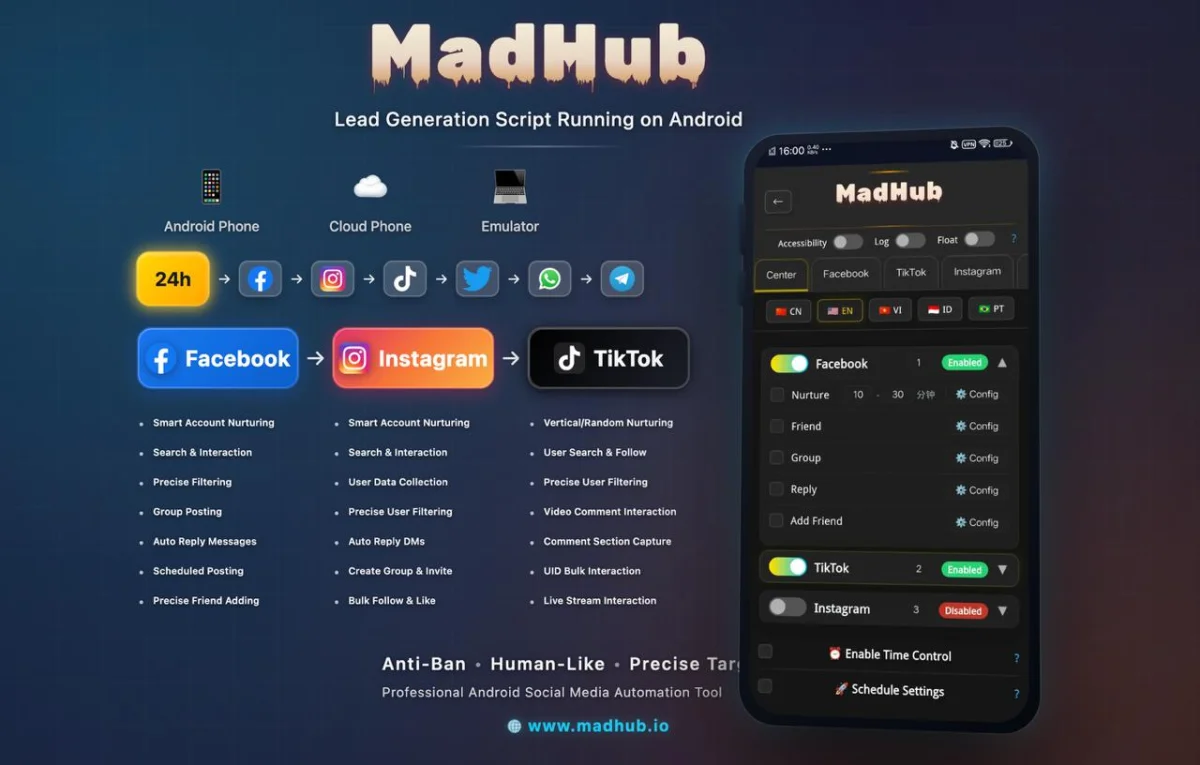
To filter users effectively based upon follower counts & interaction metrics:
- Access user search functionality within Mist Hub dashboard.
- Input relevant keywords tied closely with targeted audience interests into designated fields under 'Search'.
- Use filters such as follow count range from X-Y ranges ensuring high-engagement profiles are chosen first!
Practical examples showcase success stories where marketers successfully captured audiences leading back toward business pages enhancing visibility exponentially over time!
Maximizing Engagement with Commenting Tools
Automating Comments on TikTok Videos
Engaging actively through comments is vital; thus here’s how one can automate this process efficiently:
- Start by searching videos around trending topics via keyword input options available in comment features section
- Enter necessary filters e.g., date published ought not exceed three weeks ago & apply limits accordingly regarding content types beforehand!
- Compose impactful comments strategically crafted using persuasive language directed hopes toward increasing visibility post engagements made thereafter!
Engaging Users Through Video Comment Sections
Extracting Valuable User Data from Comments
To extract useful data seamlessly outta comment sections after targeting posts correctly;
- Filter based upon reaction rates combined alongside narrative sentiment evaluations concerning viewer responses!
- Initiate outreach efforts targeting commenters who indicated interest through replies urging them possibly back onto business pages thereby maximizing return potentials substantially observed previously across case studies highlighted previously too!
Streamlining Live Interactions: Maximize Your Reach in TikTok Live Streams
Automating Engagement During Live Sessions
Enhancing viewer interactivity throughout live sessions holds significant potential henceforth utilizing automated actions might contribute positively overall experiences shared among viewers alike;
- Deploy configurations allowing preset comment formats sent periodically during streams boosting participation levels thereof !
- Strategically selecting timing sequences which correspond directly along attendee attentiveness peaks enhances distinct share experience equally enjoyed gradually evolving organically over time yielding fruitful dividends down line ahead!!
Building a Strong Database: Collecting User Information
UID Collection Techniques Using MadHub's Features
Gather target audience data effortlessly utilizing powerful built-in capabilities offered via respective product lines ;
- Methods include accessing profile lists sourced off popular creators known fitting demographic criteria aligning appropriately toward desired outreach goals yielding maximum effectiveness consistently observed repeatedly proven case studies outlined earlier detailing successful outcomes stemming predominantly originating therein!