Bulk Operation Tool: Simplify Your Instagram Management with Ease
Instagram marketing can be greatly enhanced by utilizing a bulk operation tool, which streamlines the management of multiple accounts and content scheduling, thus saving time and improving efficiency. With tools like MadHub, marketers can easily elevate their Instagram strategies to new heights.
Introduction to Bulk Operation Tools
Bulk operation tools are essential in social media management as they allow users to handle multiple tasks at once. These tools enable marketers to schedule posts, manage interactions, and analyze performance metrics across various accounts from one central interface. In the context of Instagram marketing, such capabilities can lead to increased engagement rates and more effective audience targeting.
Why Use a Bulk Operation Tool for Instagram?
Marketers face several challenges on Instagram:
-
Time-consuming content scheduling: Manually posting content takes valuable time that could be spent on strategic planning.
-
Difficulty managing multiple accounts: Juggling numerous profiles without an organized system leads to inconsistencies in branding and messaging.
-
The need for consistency in posting: Regularly scheduled posts help maintain audience engagement but are often neglected due to lack of organization or time.
Using a bulk operation tool like MadHub addresses these challenges directly by automating many routine tasks associated with maintaining an active presence on Instagram.
Key Features of Effective Bulk Operation Tools
User-Friendly Interface
A user-friendly interface is crucial for any bulk operation tool. It allows marketers—regardless of their technical skill level—to navigate the platform easily, ensuring quick access to essential features without learning complexities.
Comprehensive Scheduling Capabilities
- Log into your MadHub account.
- Navigate to the "Scheduling" section.
- Upload your content files (images/videos) along with captions.
- Select desired publish times for each post or set them up according to specific intervals using templates provided by MadHub.
This method not only saves time but also ensures all scheduled posts align strategically with peak audience engagement times.
Automation Functions for Account Growth
Automation features within bulk operation tools like MadHub include liking posts, commenting intelligently based on algorithms set by users, and following potential customers who align with specified parameters such as interests or demographics. This kind of automation enhances organic growth while minimizing manual interaction efforts.
Setting Up MadHub for Optimal Performance
Installation Process
To get started with MadHub:
- Download the app from a reliable source or install it on your Android device or cloud phone.
- Follow the prompts during installation; ensure you grant necessary permissions (like access to storage).
Configuration Settings
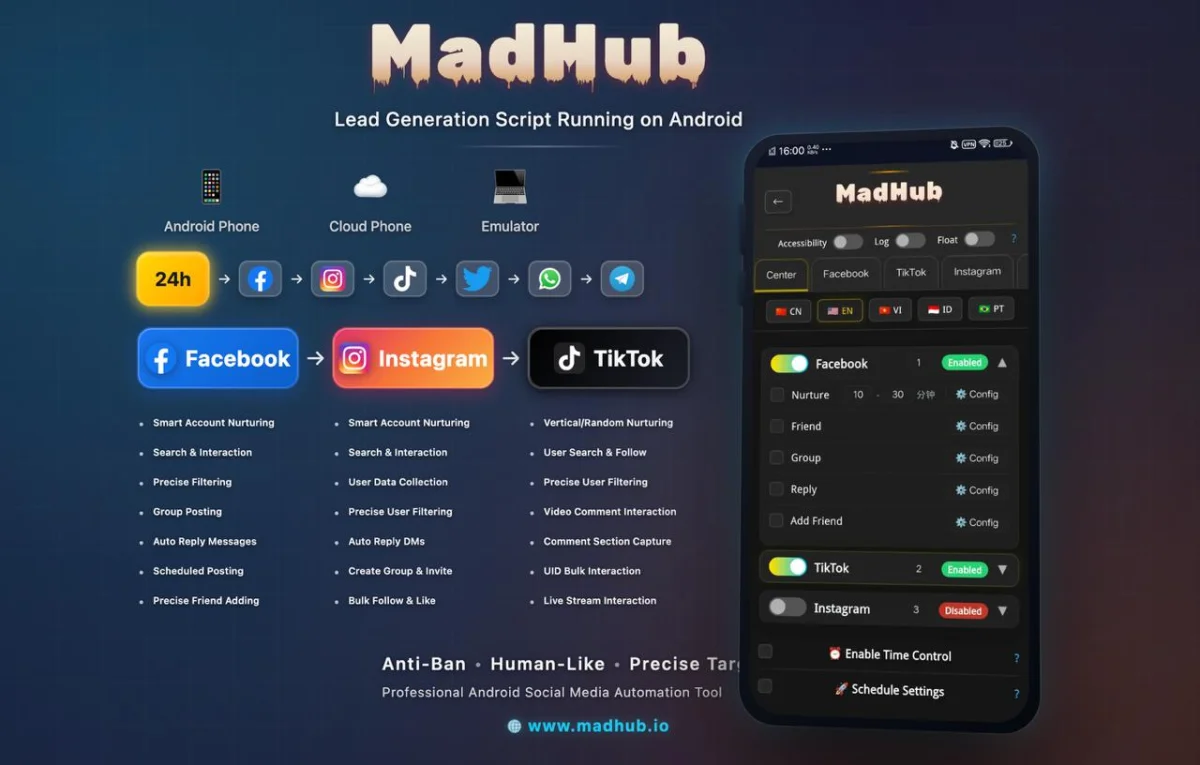
Once installed:
- Open MadHub and create your user profile.
- Configure privacy settings under “Account” -> “Privacy,” ensuring secure operations aligned with automation best practices (like limiting visibility where necessary).
- Set preferences related to interactions (e.g., frequency of automated likes/comments).
These settings optimize performance while keeping your account's security intact.
How to Effectively Use MadHub's Bulk Upload Feature
Preparing Content for Upload
Before utilizing the bulk upload feature:
- Format images/videos according to Instagram specifications (1080x1080 pixels recommended).
- Write engaging captions relevant both visually and contextually (limit caption length should ideally not exceed 2200 characters).
Steps to Execute a Bulk Upload
Executing a bulk upload is straightforward:
- Login via the MadHub interface.
- Choose what type(s) of content you wish to upload: Posts/Stories/Reels.
- Utilize templates created earlier if applicable; this guarantees brand aesthetics remain consistent even when handled through batch actions.
By following these steps diligently, marketers maximize operational efficiency while ensuring high-quality output across all platforms used within their campaigns.
Maximizing Engagement through Proper Timing
Analyzing Audience Behavior
Understanding when followers engage most actively is key; utilize insights provided by Instagram analytics available inside MadHub itself! You can filter data regarding follower activity hourly/daily trends showing peak usage times relative based upon historical data compiled over previous weeks/months’ performances would be ideal here too!
Scheduling Posts at Peak Times
With this knowledge gained from analysis conducted above,
- Schedule future postings meticulously around identified peak hours—the goal being increasing visibility thereby propelling overall reach significantly upward!
Adopting these best practices will undoubtedly heighten user engagement levels exponentially compared against arbitrary timing standards previously employed prior leveraging insightful metrics offered through analytical tooling embedded right into systems themselves!
Monitoring Success: Tracking Post Performance
Analytics Dashboard Overview
MadHub provides an intuitive dashboard displaying critical performance metrics such as reach numbers generated per post over defined periods alongside other vital KPIs including likes received/comments generated etc.—all valuable indicators dictating effectiveness surrounding campaign strategies implemented thus far collectively monitored frequently promotes iterative learning opportunities accordingly optimizing approaches iteratively moving forward continuously validating efficacy throughout entire processes involved therein systematically managed holistically enough encompassed next phases ahead smoothly thereafter assured less friction encountered generally speaking overall too consistently maintained long-term sustainability objectives met consistently achieved eventually cumulatively building momentum thereafter added benefits accrued synergistically realized incrementally compounded cumulative effects observed thereupon sustained indefinitely onwards surely then propelled forwards dynamically charged onward understandably confidently continually...
(Continues...)
Building Community Through Automated Messaging Features
Setting Up Auto Responses
How-to guide on configuring automated replies using MadHub’s messaging feature improves customer interactions without manual effort.
Case Examples:
Businesses successfully increasing engagement rates through timely responses have seen positive results after implementing similar systems.